Your notch, earning its keep.
Perch turns the MacBook notch into three things you will actually use: a Spotify widget, a call-health monitor that knows whose connection is breaking the meeting, and a focus timer that holds you to one task.
One notch, three modules. Music when you play it, the orb the moment a call starts, the task note while you're heads down.
Grab the early build.
Free, tiny, and notarized, so it installs with zero warnings. Drop it in Applications and your notch starts singing, then quietly watches your calls too.
⬇ Download Perch Perch 0.4.3 · 1.5 MB · Free · macOS 13+ · notched MacBooks only · NotarizedAnd it knows whose fault the bad call is.
When a call goes choppy, everyone silently panics: is it me? Perch answers it. On any call (Zoom, Teams, Meet, Webex, FaceTime) it watches your Wi-Fi, your router, your internet and the call provider, then tells you in plain English which one is failing, or that your side is clean and it's them. If a good call turns bad, the notch drops down and says so before the other person has to.
And it holds you to one thing.
Click the notch, type the task, pick how long. It hangs under the notch counting down, the one thing on screen you have to answer to. The rim glows while the clock runs and turns red the second you go over, because a timer that just disappears lets you pretend it never happened. Track changes stop announcing themselves until you're done. One task means one task.
Made only for the notch.
Perch lives in the notch, so it only exists on Macs that have one. No notch, no Perch — it won't show up on anything else, by design.
✓ Perch runs here
- MacBook Pro 14″ & 16″ (2021 or later)
- MacBook Air (M2, 2022 or later)
- macOS 13 Ventura or later
- Call health needs macOS 14.4 or later
If your screen has the little black cutout — welcome.
✕ Not for these
- Mac mini, Mac Studio, Mac Pro
- iMac — any year
- Pre-2021 MacBooks (no notch)
- External displays (Perch stays on the built-in screen)
Nothing personal. There's just no notch to perch on.
What else is in the cave.
Under the music and the calls sits a live-activity engine: timers,
builds, deploys, anything you can pipe through the perch command. Some of
it is running today; the rest is ripening.
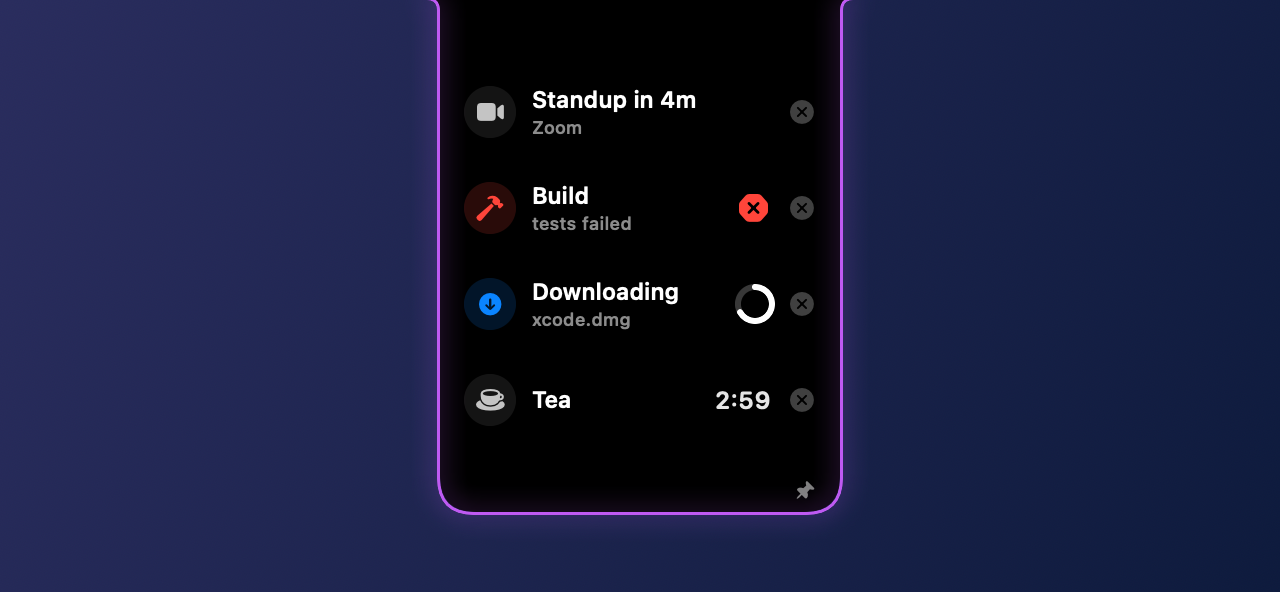
Real lab render of the activity engine — already running on the bench.
More cool shit, aging nicely. 🧀